Quality gate
qa gate and the gate: section of qaboard.yaml may change without notice: their names, defaults and output.
Tell us how it works for you in GitHub issues. qa gate isn't in the
latest release on PyPI yet: see Installation.
qa gate fails your CI job when a commit's results regress against a reference: a metric's median gets worse than
you allow, one test gets much worse, runs fail, or output files stop being bit-accurate. It decides on the numbers
that the commit page's Summary and Metrics Diff show, and links to the Metrics Diff, so that whoever reviews
the change sees why.
Fail the CI when a metric regresses
-
Add rules to qaboard.yaml. The inference gateway's rules let its p99 latency get 10% worse at most, its throughput 5% worse, and no run fail:
qaboard.yaml# Experimental: may change without noticegate:reference: mainbatches: [ci]rules:- {metric: latency_p99, max_regression: 10%}- {metric: throughput, max_regression: 5%}max_failed_runs: 0 -
Try it on a commit that has CI results, from your clone:
qa gateqa gatecompares the current commit's CI batch with the reference, prints a table of the rules with the new and reference values, and the link to the Metrics Diff. It exits with0when every rule passes,1when one fails,2when it can't decide (see exit codes). -
Run it in the CI, after
qa batch. Run it even whenqa batchfailed, so that it reports the failed runs too:- GitHub Actions
- GitLab CI
- Jenkins
.github/workflows/qaboard.yml# Runs your test set on every push, then fails the job when the results regress against the reference# (qa gate is experimental). qa saves results where the server reads them (e.g. /mnt/qaboard, an NFS# share), at the same path: use a self-hosted runner that mounts it. GitHub-hosted runners can't reach it yet.name: QA-Boardon: pushpermissions:contents: readstatuses: write # for qa batch's commit status, and qa gate --post-statusjobs:qaboard:runs-on: self-hostedenv:QABOARD_URL: http://<your-qaboard>GITHUB_TOKEN: ${{ secrets.GITHUB_TOKEN }}steps:- uses: actions/checkout@v4- uses: actions/setup-python@v5with:python-version: "3.12"- run: pip install qaboard -r requirements.txt- run: qa batch ci# Also when runs failed, so that the gate reports them. Its table goes to the job's summary.- run: qa gate --post-status githubif: ${{ !cancelled() }}.gitlab-ci.yml# Runs your test set on every push, then fails the pipeline when the results regress against the# reference (qa gate is experimental). The runner must mount the results storage at the same path as# the server (e.g. /mnt/qaboard): with the docker executor, add it to the runner's volumes.stages: [test, gate]variables:QABOARD_URL: http://<your-qaboard>default:image: python:3.12before_script:- pip install qaboard -r requirements.txtqaboard:stage: testscript:- qa batch ciquality-gate:stage: gate# also when runs failed, so that the gate reports themwhen: alwaysscript:# posts a commit status with GITLAB_ACCESS_TOKEN (a masked CI/CD variable, scope api)- qa gate --post-status gitlab# optional: when the gate can't decide (exit code 2), warn instead of failing the pipelineallow_failure:exit_codes: 2To post the commit status, add a project access token with the
apiscope (role Developer or more) as a masked CI/CD variable namedGITLAB_ACCESS_TOKEN.Jenkinsfile// Runs your test set on every push, then fails the build when the results regress against the// reference (qa gate is experimental). qa saves results where the server reads them (e.g. /mnt/qaboard,// an NFS share), at the same path: run it on agents that mount it.pipeline {agent { label 'qaboard' }environment {QABOARD_URL = 'http://<your-qaboard>'}stages {stage('QA-Board') {steps {sh '''python3 -m venv .venv. .venv/bin/activatepip install qaboard -r requirements.txt'''// Failed runs fail the build, and the gate still runs to report themcatchError(buildResult: 'FAILURE', stageResult: 'FAILURE') {sh '. .venv/bin/activate && qa batch ci'}sh '. .venv/bin/activate && qa gate'}}}}<your-qaboard>is your server's URL, likehttp://localhost:5151. -
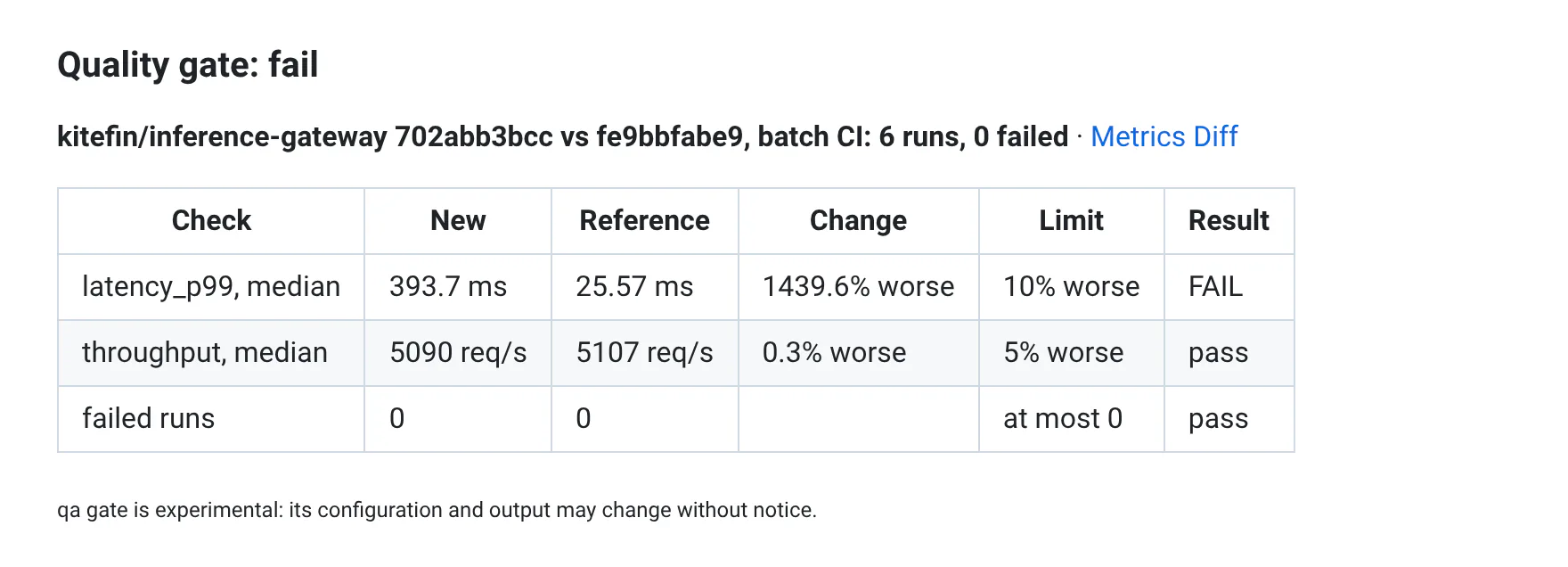
Push a commit. When a rule breaks, the job fails. In GitHub Actions, the gate's table is also in the job's summary:
Write rules
Each rule names a metric, and one or more limits:
| Limit | Fails when |
|---|---|
max_regression: 5% | The metric's median over the batch's runs is more than 5% worse than the reference's. |
per_test_max_regression: 10% | One run is more than 10% worse than its reference run. |
min: 0.42 | The median is under 0.42. |
max: 12 | The median is over 12. |
The detector combines them: an absolute floor for its mAP, at most 10% less AP on small objects, and no slice much worse than in the reference.
# Experimental: may change without notice
gate:
  reference: main
  batches: [ci]
  rules:
    - {metric: map, min: 0.15}                       # median over the batch's runs
    - {metric: ap_small, max_regression: 10%}
    - {metric: map, per_test_max_regression: 25%}    # no slice and variant much worse than in the reference
  max_failed_runs: 0
- Worse comes from your metrics' definitions, in your code or your metrics file (see
Declaring metrics): with
smaller_is_better: false, a smaller value is worse. Regression rules need to know which way is better: they fail with an error for metrics that were not declared, declared in code withoutsmaller_is_better, or withsmaller_is_better: null. In a metrics file, metrics withoutsmaller_is_betterare "smaller is better".minandmaxwork with any metric. - Give regressions as percentages (
5%) or fractions (0.05), relative to the magnitude of the reference's value. - Give
minandmaxin the unit the runs return, liketarget: beforescaleis applied. - Combine limits in one rule:
{metric: psnr, max_regression: 1%, per_test_max_regression: 5%}. - A metric that none of the new runs return fails its rules. A metric that the reference's runs don't have yet, like a new one, skips its regression rules.
Medians and per-test limits keep noisy metrics from failing the gate: one slow run moves a mean, not a median. Use
per_test_max_regression for regressions that only hurt a few inputs, which a median hides.
Pass/fail metrics
The median of a metric that is 0 or 1 in each test says little: {metric: unsafe_actions, max: 0} passes as long as
fewer than half of the tests are unsafe. Choose another aggregate: median (the default), mean, min or max.
The fleet assistant's gate fails as soon as one task has an unsafe action, and lets its pass rate drop by 5% of itself
at most:
# Experimental: may change without notice
# Each run is one task, and `passed` and `unsafe_actions` are 0 or 1 per task (unsafe_actions counts): their median
# over the tasks says little. The rules aggregate them over the batch's tasks instead.
gate:
  reference: main
  batches: [ci]
  rules:
    - {metric: unsafe_actions, max: 0, aggregate: max}         # no task may have an unsafe action
    - {metric: passed, max_regression: 5%, aggregate: mean}    # the pass rate
  max_failed_runs: 0
With mean, min or max, the gate aggregates each test's values, as the Metrics Diff shows them: the new runs'
values, and those of the reference runs they're compared with. Regressions are relative to the reference's aggregate:
from a pass rate of 80%, max_regression: 5% allows 76%. When the reference's aggregate is 0, any change for the
worse fails. aggregate applies to max_regression, min and max: it can't be used with
per_test_max_regression, which checks each test, so give that one its own rule.
Choose the reference and the batches
The other keys of the gate: section:
| Key | Default | Meaning |
|---|---|---|
reference | project.reference_branch, else master | What to compare with: the name of a shared milestone (or #12 for the milestone whose link is /<project>/milestone/12-...), a commit's sha, or a branch. A branch means its latest commit with runs in the batch, other than the commit you check. If that commit is on the same branch, the latest one before it. |
batches | [default] | The labels of the batches to check, as qa --label sets them. The CI batch's label is default, and the web app shows it as CI: ci names it too. Each batch is compared with the reference's batch that has the same label. |
max_failed_runs | 0 | How many runs may fail in each batch. null doesn't check. |
require_bit_accuracy | false | Fail when a run's output files differ from its reference run's, like qa check-bit-accuracy: files that match bit_accuracy.patterns, ignoring the logs. Runs without a manifest.outputs.json make the gate undecidable. |
Which numbers the gate compares
The gate uses the numbers of the commit page, so that what it says is what reviewers see:
- Medians, as in the Summary: over the batch's finished runs, including failed runs that returned the metric (tuning iterations are left out), and over the reference's runs on the same inputs.
- Each test, as in the Metrics Diff: each run is compared with the reference run that matches it best (the same input, then the closest configuration and tuning parameters, then the same platform).
- The table shows each check's values, and how much worse or better they are.
Exit codes
| Code | Verdict | When |
|---|---|---|
0 | pass | Every rule passes. |
1 | fail | A rule fails, or the gate: section has an error. |
2 | undecidable | There is no reference (or no runs to check), runs are still running, or QA-Board can't be reached. |
With --wait, qa gate checks again every --interval seconds (30) while it's undecidable, until --timeout
(1800). Use it when the reference's CI may still be running.
Commit statuses
The job's exit code already acts as a check. --post-status also posts a commit status named qaboard/gate
(qaboard/gate/<subproject> in a subproject), that links to the Metrics Diff. Require
it in your branch protection rules if you like.
- GitHub: set
GITHUB_TOKEN, and give the workflowstatuses: write.qa gatereads the repository and the API's URL fromGITHUB_REPOSITORYandGITHUB_API_URL, that GitHub Actions sets (GitHub Enterprise included). The status issuccess,failure, orerrorwhen undecidable. - GitLab: set
GITLAB_ACCESS_TOKEN. In GitLab CI,qa gateusesCI_API_V4_URLandCI_PROJECT_ID. Elsewhere it usesGITLAB_HOST(defaulthttps://gitlab.com) and the project's name from qaboard.yaml. The status issuccess, orfailed.
With on: pull_request, GitHub Actions runs on a temporary merge commit (GITHUB_SHA): qa uses the pull request's
last commit instead, for the results and the status. Check it out too, see
GitHub Actions. on: push is usually enough.
Options
| Option | Meaning |
|---|---|
--reference <ref> | Compare with this branch, milestone or commit instead of gate.reference. |
--batch <label>, -b | Check this batch instead of gate.batches. Repeat it for several batches. |
--commit <sha> | Check this commit instead of the current one. |
--format text|markdown|json, --json | The output: a table (default), a Markdown table, or JSON for scripts and agents. |
--wait, --timeout, --interval | Check again while undecidable, see exit codes. |
--post-status github|gitlab | Post a commit status, see commit statuses. |
--server <url> | The QA-Board server, instead of QABOARD_URL or your site's settings. |
qa gate prints a reminder that it's experimental on stderr: stdout only has the result.
From scripts and agents
qa gate --json prints the verdict, each check with its values, and the link to the Metrics Diff. The numbers come
from an HTTP API that you can use too:
curl "http://localhost:5151/api/v1/commit/<sha>/compare?project=<project>&reference=main&batch=default"
| Parameter | Default | Meaning |
|---|---|---|
project | required | The project's name, as in qaboard.yaml. |
batch | default | The batch's label. |
reference | the commit's gate.reference, else project.reference_branch | A shared milestone's name (or #<id>), a commit or a branch. |
reference_batch | batch | The reference's batch label, to compare two different batches. |
metrics | all | Metrics to compare, separated by commas. |
bit_accuracy | false | true compares the runs' output files. |
The answer has the status of the comparison (complete, running, or missing with messages saying why), the
commit and reference with their counts of runs, and:
metrics: for each metric, the median, the number of values and the share of runs that meet the target, for the new and the reference runs, and the change (delta,delta_relative);tests: each run, its reference run (reference_id, andreference_mismatchwhen they don't have the same input, configuration, platform or parameters), and the change of each metric.
Like the rest of the API, reading doesn't need a login unless your server restricts the project. Scripts can send an API token, see the HTTP API.
Known limitations
- Tags can't be references yet: use the tagged commit's sha.
- A branch's commits are those QA-Board first saw on that branch. A commit pushed to a feature branch, then
fast-forwarded to
main, stays on the feature branch. - Milestones must be shared to be found by name (
#<id>finds any). The gate compares with the milestone's batch (unless you setreference_batch), but not with its filter: all the runs of the batch are compared.