Bit accuracy tests
Check that a change leaves your outputs identical, byte for byte: a refactoring, a compiler upgrade, or a model of a
chip that the silicon must match. qa check-bit-accuracy fails your CI when output files differ from the
reference's, and the web app's Output Files view shows which files changed, and how.
Fail the CI when outputs change
The camera ISP's fixed-point model must stay bit-accurate: the camera chip implements it. Its CI checks it on every commit.
-
Choose the files to check with
bit_accuracy.patternsin qaboard.yaml (all files by default, see what files are checked). The camera ISP checks its output image, the stages' images and 16-bit buffers, and the register dump:qaboard.yamlbit_accuracy:patterns: ['out.png', 'stages/*.png', 'raw/*.u16', 'regs.txt']plaintext: ['*.txt'] -
Check after the batch, in the CI.
qa check-bit-accuracy --batch <batch>compares the runs ofqa batch <batch>with the reference's (see which reference):- GitHub Actions
- GitLab CI
.github/workflows/bit-accuracy.yml# Runs a batch on every push, then fails the job when an output file differs from the reference's.# qa saves results where the server reads them (e.g. /mnt/qaboard, an NFS share), at the same path:# use a self-hosted runner that mounts it. GitHub-hosted runners can't reach it yet.name: Bit accuracyon: pushpermissions:contents: readstatuses: write # for qa batch's commit statuschecks: read # to wait for the end of the reference commit's CIjobs:bit-accuracy:runs-on: self-hostedenv:QABOARD_URL: http://<your-qaboard>GITHUB_TOKEN: ${{ secrets.GITHUB_TOKEN }}steps:- uses: actions/checkout@v4with:# on the reference branch, commits are compared with their parentsfetch-depth: 2- uses: actions/setup-python@v5with:python-version: "3.12"- run: pip install qaboard -r requirements.txt- run: qa --platform hw-model batch bitexact- run: qa --platform hw-model check-bit-accuracy --batch bitexact.gitlab-ci.yml# Runs a batch on every push, then fails when an output file differs from the reference's.# The runner must mount the results storage at the same path as the server (e.g. /mnt/qaboard):# with the docker executor, add it to the runner's volumes.stages: [test, bit-accuracy]variables:QABOARD_URL: http://<your-qaboard>default:image: python:3.12before_script:- pip install qaboard -r requirements.txtbitexact:stage: testscript:- qa --platform hw-model batch bitexactbit-accuracy:stage: bit-accuracy# optional: report the files that changed without failing the pipelineallow_failure: truescript:# waits for the end of the reference commit's pipeline with GITLAB_ACCESS_TOKEN (scope read_api)- qa --platform hw-model check-bit-accuracy --batch bitexact<your-qaboard>is your server's address, likelocalhost:5151. -
Push a commit. When files differ,
qa check-bit-accuracylists them, run by run, prints a link to the commit's Output Files view, and exits with an error. When they're all identical, it passes.
qa check-bit-accuracy also compares the runs' input files (see manifests), so it
tells you when a change comes from the inputs. To fail on metrics instead of files, see the
quality gate, whose require_bit_accuracy checks the same files.
See which files changed
The commit page's Output Files view lists the files of each run that differ from the reference run's (identical files are hidden by default). Click a file to diff it with the reference's:
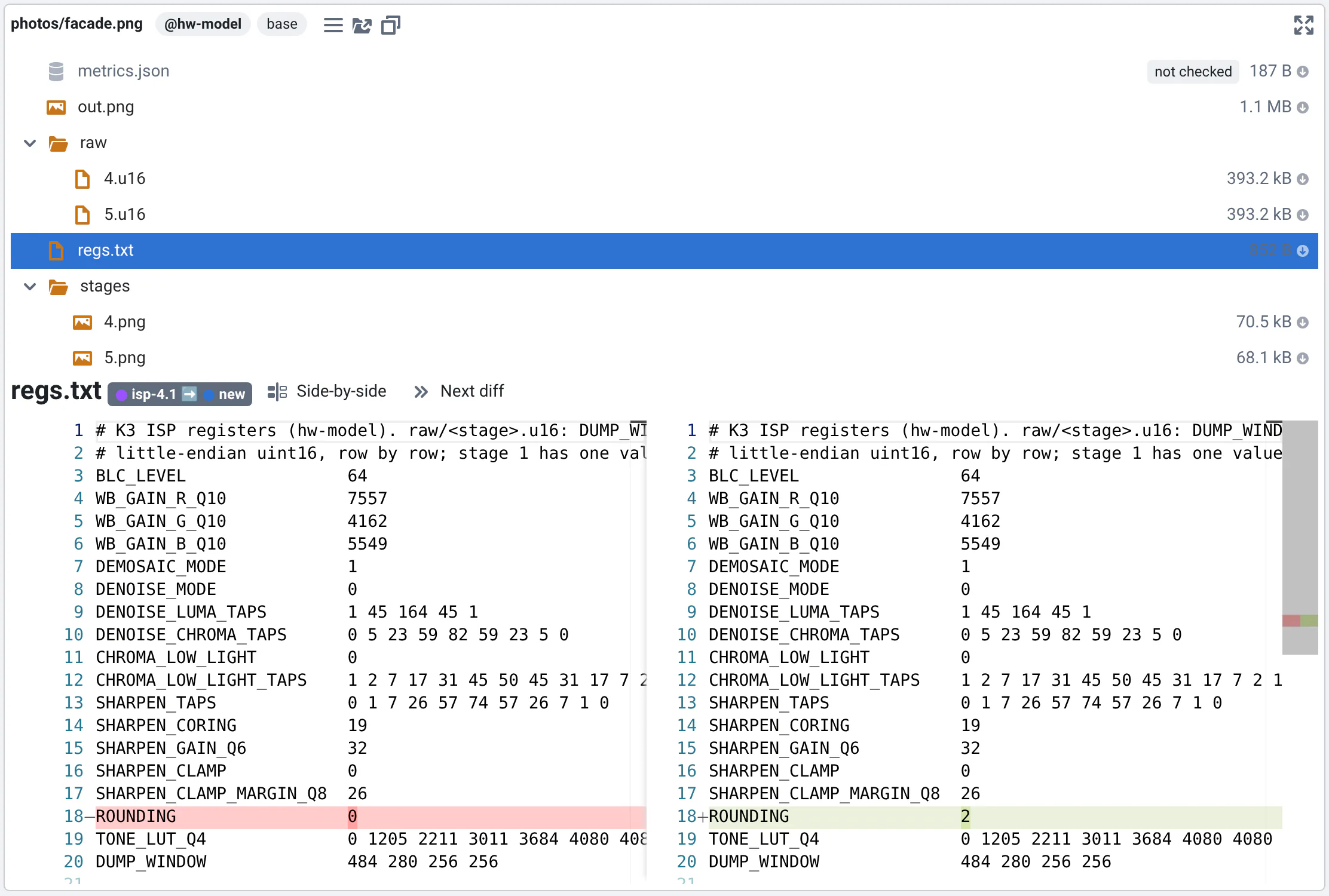
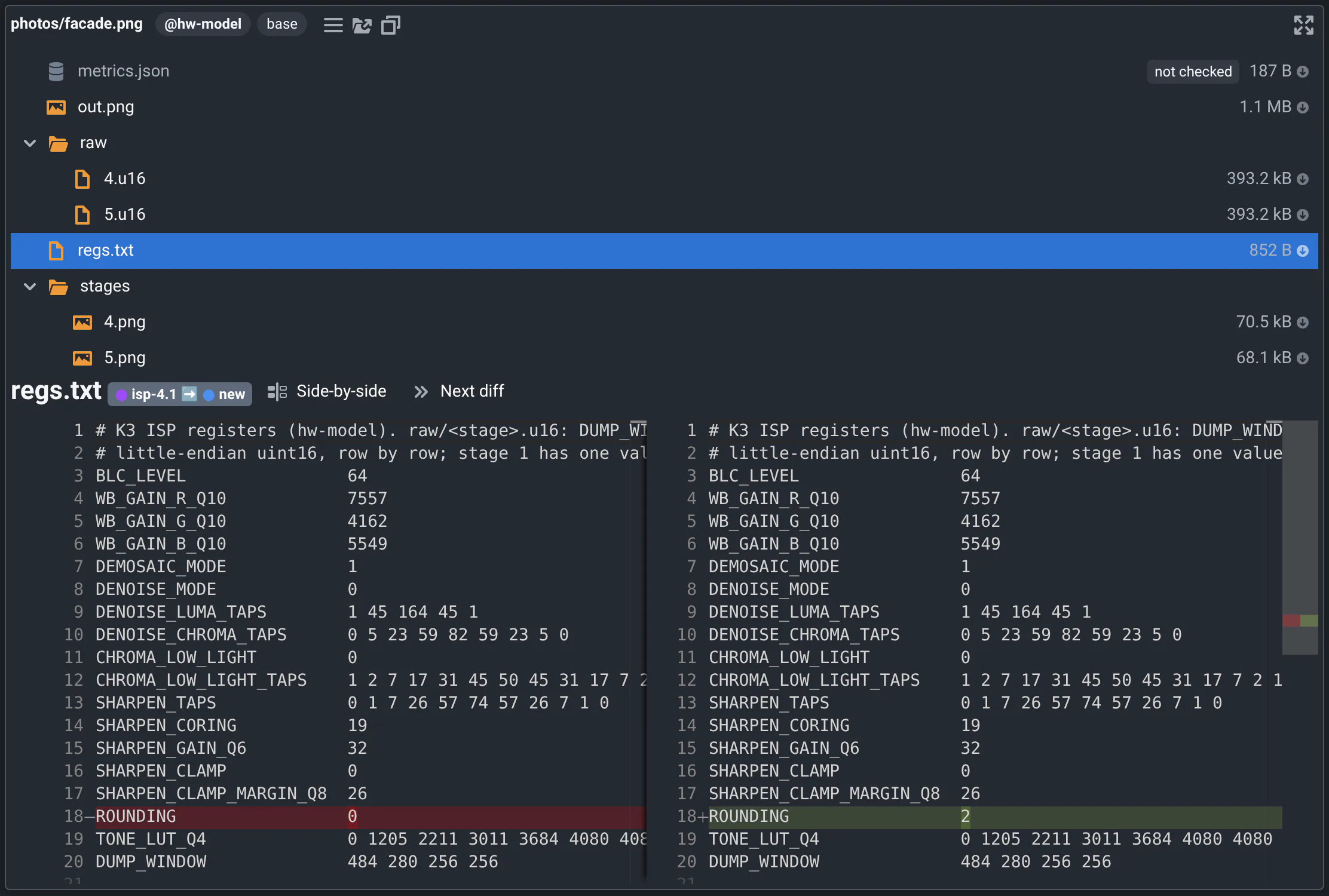
Like qa check-bit-accuracy, the web app only checks the files selected by bit_accuracy.patterns. When all of them
are identical, the run is tagged Bit-accurate. The other files are still listed when they differ, greyed and
tagged not checked: for instance metrics.json, which has the run's measured run time. Unlike
qa check-bit-accuracy without --strict, checked files that exist in only one of the runs also make the web app
show differences.
What files are checked?
Files matching the patterns of bit_accuracy.patterns in qaboard.yaml are checked. Without patterns, all files
are checked.
bit_accuracy:
  patterns: ['out.png', 'stages/*.png', 'regs.txt']
  ignore: ['debug/']
- Patterns are glob patterns that match the end of a file's path in the run's output directory:
out.pngchecks out.png and some/folder/out.png.*also matches/. - Files whose path starts with one of the
bit_accuracy.ignorepatterns are not checked. - Files that change at each run are never checked: metrics.json (it has the run time), run.json, log.txt,
log.lsf.txt and manifest.inputs.json (
qa check-bit-accuracycompares it on its own, see manifests).
The web app's Output Files and the quality gate's require_bit_accuracy check the same
files.
If you work with text files on both Linux and Windows, line endings can make identical files differ. Say which files
are text with bit_accuracy.plaintext, or which are binary with bit_accuracy.binary, like the camera ISP's
plaintext: ['*.txt'].
Which reference
qa check-bit-accuracy --batch <batch> compares the results of qa batch <batch> with:
- the latest commit of
project.reference_branch(default:master) on your git remote, - or, in the CI of that branch, the commit's parents: a merge is compared with the commits it merges,
- or what you give with
--reference: a branch, a tag or a commit. The camera ISP compares with its release,qa --platform hw-model check-bit-accuracy --batch bitexact --reference <release-sha>.
If the reference commit's CI isn't over, qa waits for it. It asks GitLab for the commit's pipeline jobs, or GitHub
for its statuses and check runs, so it needs a token (see CI integration);
without one, it doesn't wait. Skipped jobs, and jobs allowed to fail, count as successful.
bit_accuracy.failed_ci_job_name only looks at that job: in a subproject, it looks for the job
<failed_ci_job_name> <subproject> (with the name of the subproject's folder).
When the reference's CI failed, it's compared anyway. With bit_accuracy.on_reference_failed_ci: compare-first-parent,
qa goes back to its first parent instead, at most bit_accuracy.max_parents_depth times (default 5): useful when a
build failure left the reference without results.
Where runs are found
qa check-bit-accuracy looks for the runs that have the same input, configurations, platform and tuning parameters as
yours (with --reference-platform, on that platform), in the reference's batch with the same label (or
--reference-label). With --reference-match closest, it compares with the closest run on the same input instead,
like the web app picks reference runs (see options):
- It asks QA-Board where they are. It knows the runs of every CI and
qa --sharebatch, wherever they were saved. - Otherwise it looks in the storage, where
qasaves runs (storagein qaboard.yaml): offline (qa --offline), when QA-Board can't be reached, or for runs it doesn't know. If your storage settings have a folder per user, like/mnt/outputs/{user}, it looks in every user's folder: the reference's runs were saved by its CI's user. When a run is missing, it prints where it looked.
Your own runs are where qa batch saves them: in your project's output/ folder, or with qa --share and in the CI,
in the storage. The reference's runs are CI runs, so their label isn't prefixed by your name like with qa --share:
to compare with runs you shared, use --reference-label "@<your-user>| <label>".
Options
--strict: by default only the files that exist in both runs are compared. With--strict, files that exist in only one of the runs are errors too.--reference-label: compare with the reference's runs that used another label, e.g.qa --label new check-bit-accuracy --batch all --reference-label old.--reference-match closest: compare each run with the reference's closest run on the same input, like the web app: the one with the fewest different configurations, then tuning parameters, on the same platform if possible. Use it when the reference didn't run the same configurations, e.g. you're testing a new one.qasays which runs were compared with a different one, and how they differ. By default (exact) runs without an identical reference run fail.--reference-platform: compare with the reference's runs on another platform, e.g.qa --platform hw-model check-bit-accuracy --batch <batch> --reference-platform linux.--batchcan be repeated, and--batches-filenames the batches files, like forqa batch.
Input and output manifests
Each run saves in its output directory a manifest.outputs.json, with a hash of each output file, and a
manifest.inputs.json, with a hash of the input files (at most 200 files for an input folder). qa check-bit-accuracy
compares both, so it also tells you if the inputs changed. To list other files as inputs, set
context.obj['manifest-inputs'] to a list of paths in run().
Compare with manifests saved next to the inputs
For specific use cases, qa check-bit-accuracy-manifest --batch my-batch (it also accepts --strict) checks the
results against manifests stored in the database next to the input files, instead of against another commit. To save
those manifests, use qa batch my-batch --save-manifests-in-database (the flag is forwarded to qa run). It only
works for inputs that are folders.
Custom output comparisons
Bit accuracy checks compare the hashes of your output files, computed once and stored in the manifests. To compare files another way, ignoring timestamps or comparing their meaning, supply your own comparison function:
-
Implement a
cmpfunction in a Python file:cmp.pyfrom pathlib import Pathdef cmp(path1 : Path, path2 : Path) -> bool:"""Checks if the files have the same content, like QA-Board does by default"""return path1.read_bytes() == path2.read_bytes() -
Ask
qato use it:export QA_BITACCURACY_CMP=/path/to/cmp.pyqa check-bit-accuracy --batch <batch>