Cleaning the storage
Free disk space and keep the database small from Admin → Storage: delete for good the runs users deleted, purge the runs whose files are gone, delete commits' artifacts, delete old results as each project's qaboard.yaml says, find and delete what QA-Board doesn't track, and schedule these jobs instead of keeping cron jobs on the server. Jobs run in the background: their page shows their progress, their log, and every error.
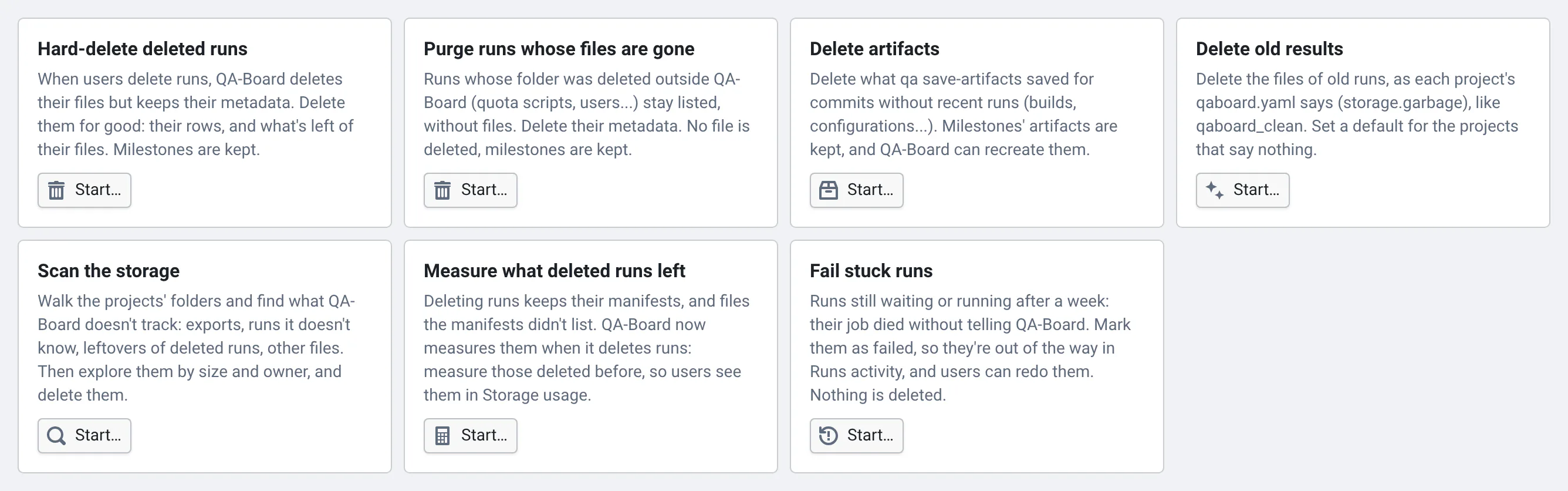
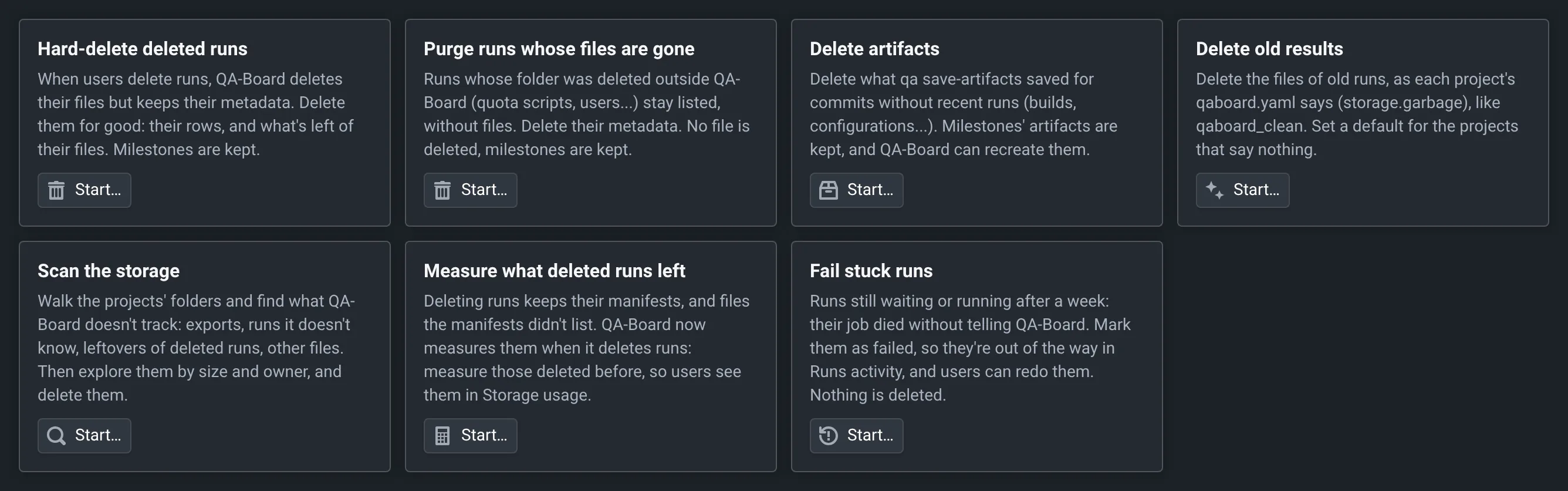
Delete the runs users deleted, for good
When users delete runs, QA-Board deletes their files but keeps their metadata, so they stay listed and can be redone. On a busy server, those runs can become most of the database.
- In Admin → Storage, click Start… in Hard-delete deleted runs.
- Choose the projects, with patterns:
*matches anything, including/, sogroup/repo*is a project and its subprojects. Leave some out with Except. The form says how many projects match. - Choose the runs' dates: Runs created before takes a date (
2026-01-31, UTC) or a duration before the job starts (1month). Count the deleted runs says how many match. - Start a dry run first: it deletes nothing and says what would be deleted. On its page, Run it for real.
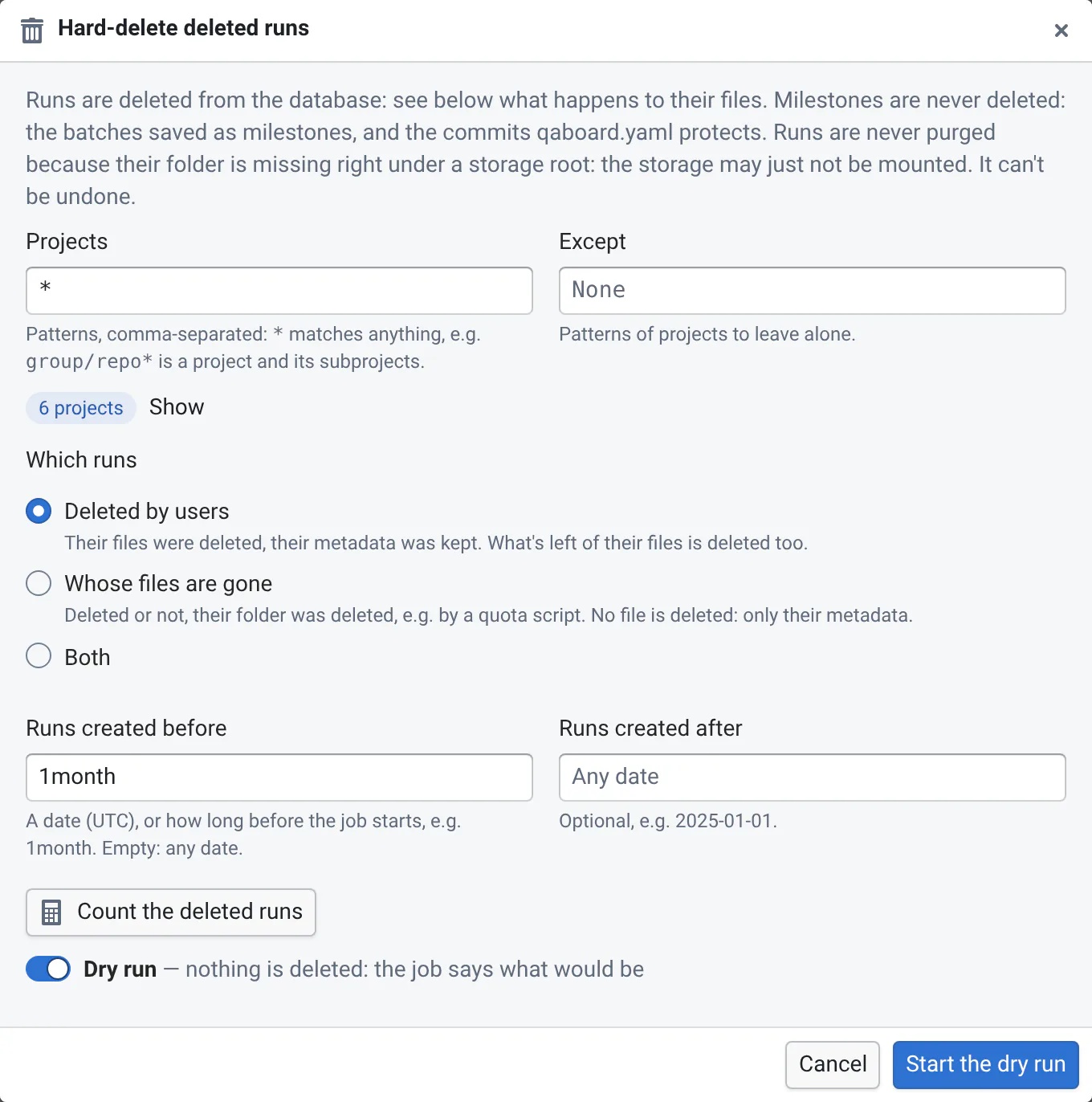
What's left of the runs' files is deleted, then their rows. Batches left without runs are deleted too; commits are kept.
Milestones are never deleted: the batches saved as milestones, and the commits that
qaboard.yaml protects (the latest commit of project.reference_branch, and project.milestones). Projects that list
project.milestones need their git repository to know which commits those are: when the server can't read it, the
project is skipped, with an error.
Most deleted runs have no files left. The job checks each batch's folder once and remembers the folders that are missing, instead of checking every run's.
Purge runs whose files are gone
Runs whose folder was deleted outside QA-Board (quota scripts, users cleaning their folders...) stay listed, without files. Click Start… in Purge runs whose files are gone: it's the same job, for Which runs: Whose files are gone. It deletes their metadata, never files: runs that still have their folder are kept. Choose Both to also hard-delete the runs users deleted.
If the backend's container doesn't see a storage (autofs, NFS outage), all its runs would look like they lost their
files. So runs are never purged from a folder missing right under a storage root (QABOARD_STORAGE_ROOTS, e.g.
/algo/CIS for /algo), from a storage root that is missing or empty, or outside the storage roots: they're kept, with
a Storage not mounted? error. Check the container's mounts, and run the job again.
Delete artifacts
Commits' artifacts (what qa save-artifacts saved: builds, configurations...) are often the biggest folders. Click
Start… in Delete artifacts, and choose the projects and how long commits must have gone without runs
(Commits without runs for, e.g. 1month). It keeps:
- the artifacts of milestones: commits with batches saved as milestones (to redo or compare them), and the commits qaboard.yaml protects,
- the commits on the reference branch, unless you check Also on the reference branch (its latest commit is always kept),
- the commits with runs in progress,
- what Keep lists (artifact groups like
coverage_report, paths or globs likebuild/*.html), and what each project'sstorage.garbage.artifacts.keeplists, - the files other subprojects of the same commit still use.
Runs and commits stay. Commit pages say when and by which job the artifacts were deleted, and QA-Board recreates them when users redo runs, if qaboard.yaml says how (recreating artifacts). Commits whose artifacts folder is already gone are only marked as such. Commits with errors are tried again by the next job.
Unlike Delete old results, this job doesn't need storage.garbage.artifacts.delete in qaboard.yaml: admins decide.
Delete old results
Delete old results does what qaboard_clean does: it deletes the files of old runs, and the commits' artifacts if
qaboard.yaml asks for it, following each project's storage.garbage settings (deleting old data).
By default, older than applies to the projects whose qaboard.yaml doesn't say. The runs stay listed as deleted:
a hard delete removes them later.
Follow jobs and fix their errors
Errors don't stop a job: the run is kept, so that the next job tries again, and the error is listed on the job's page with the file that could not be deleted and its owner. Group them by kind, owner or project to see what to fix first, and Download all (CSV) to send them to the people concerned. Once fixed, Run again.
- Permissions: the server could not delete files. The worker runs as root and deletes files as their owner
(
setuid): on NFS, check that root can change to the owner's user, or fix the files' permissions. - Outside the storage: the folder isn't in
QABOARD_STORAGE_ROOTS, where QA-Board never deletes anything. - Git: the project's repository can't be read (see above).
- Storage not mounted?: a folder is missing where the storage may just not be mounted (see above).
Only one job of each kind runs at a time. Cancel a running job from its page: it stops within seconds. If it's still
Cancelling after a minute, its worker is stuck, e.g. reading a storage that doesn't answer: Stop without waiting
marks it as cancelled, so another job of its kind can start. Its worker may stay busy with it until it gets an answer:
restart the backend (or wherever qaboard-admin jobs worker runs) to stop it at once.
Users' storage usage
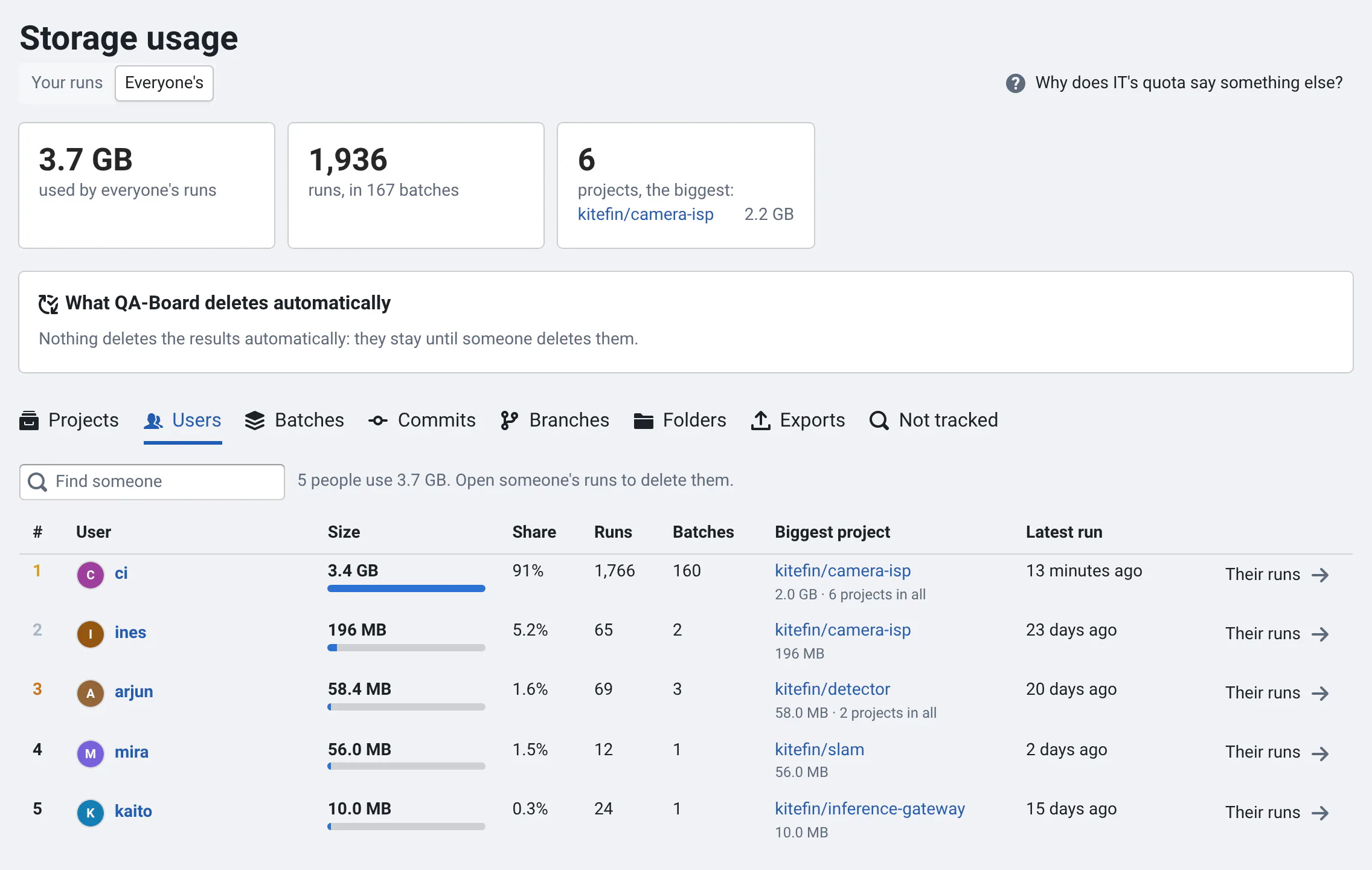
Users see how much storage their runs use, and delete their runs' files, in Storage usage (their profile menu, user guide). Their deletions are jobs too, listed here as Delete users' runs: they run next to the maintenance jobs, so users never wait for a long hard delete.
The numbers come from the storage_usage table, one row per batch and user who ran it:
- the worker updates the batches of the commits with new runs every 5 minutes, and deletions from the web app update theirs right away,
- the Storage usage schedule rebuilds it every night (
Compute storage usage): it catches runs deleted by scripts. It's created with the first worker, which also runs a first rebuild. Change or disable it here.QABOARD_STORAGE_USAGE_AUTO=0stops the worker from creating it and from updating the table.
A rebuild reads every run once, chunk by chunk: count about 5 minutes for 50 million runs.
Who sees other people's usage: admins see everyone's. Other users see other people's runs, exports and the
Users leaderboard only in the projects where they are developers or owners from a grant, a group or qaboard.yaml:
not just because they're signed in, even when projects.signed_in_role makes every signed-in user a developer. To show
everyone's usage to everyone who can see the project, set storage.others_visible_to (QABOARD_STORAGE_OTHERS_VISIBLE_TO)
to signed_in in Admin → Settings. Only signed-in users have Storage usage.
Scanning the storage
QA-Board only knows the files of its runs and artifacts. Scan the storage walks the projects' storage roots (and any other folder you add) and finds, with the owner of every file:
- Untracked runs: folders with a
run.jsonor a manifest that QA-Board doesn't know (a failed upload, a run deleted for good while its folder stayed), - Untracked exports: folders with an export's
0.qa.url,0.qa.htmlor0.common.jsonthat QA-Board doesn't track, - what deleted runs and deleted artifacts left,
- other files, e.g. copies, core dumps, users' own folders.
Open a scan from Scans to explore it like ncdu: folders by size, with a bar of what they're made of, down to the
size you chose (Details down to, 50 MB by default: smaller items are counted with their folder). Biggest untracked
lists them anywhere, by kind, owner or age. Click an owner to see only theirs. Then select entries and:
- Delete… them: only folders without anything QA-Board uses (runs, batches' files, artifacts) can be selected,
- Track exports: their owners see them in Storage usage → Exports, and can delete them,
- Add runs to QA-Board: untracked runs in a batch's folder are added to their batch, from their
run.json, manifest and metrics.
Users see what they own in Storage usage → Not tracked, from the latest scan, and can delete the folders whose files are all theirs. Scanning doesn't change anything on disk.
Delete old scans from the Scans list or the scan's page: only what they found is deleted, not the files. Users then see the latest scan that's done.
How long scans take, and what they don't see
A scan reads every file's metadata, with 8 threads by default: on network storage, latency dominates, count hours for
tens of millions of files. Schedule it at night, e.g. weekly. A scan stopped by a restart resumes: the folders it was
in are scanned again. Hard links are counted once, symlinks aren't followed, and a folder reachable under several roots (nested, symlinked or bind-mounted) is scanned once. Storage snapshots (.snapshot, .snapshots, .zfs) are always skipped, whatever Excluded paths says.
Scans see what the backend sees: the storage must be mounted at the same paths as on the machines where runs save results, and the worker reads it as root. Files of uids the backend can't name show as numbers.
Exports
Exports from the web app are recorded with their folder, project, commit, batch, who made them and their size. By
default they go to a share/ folder next to the commit's results, which is hard to find among the results. Put them all
in one place with the storage.exports_root setting (Admin → Settings, or QABOARD_EXPORTS_ROOT):
<root>/<user>/<project>/<date>-<id>. The folder must be on the same file system as the results for hard links, and
under QABOARD_STORAGE_ROOTS.
What deleted runs leave
When users delete runs, QA-Board keeps their manifests, and deletes only the files the manifests list: what the runs wrote after they ended stays. QA-Board measures what's left when it deletes runs, and users see it in Storage usage. Run Measure what deleted runs left once to measure the runs deleted before. Hard-delete deleted runs removes what's left.
Fail stuck runs
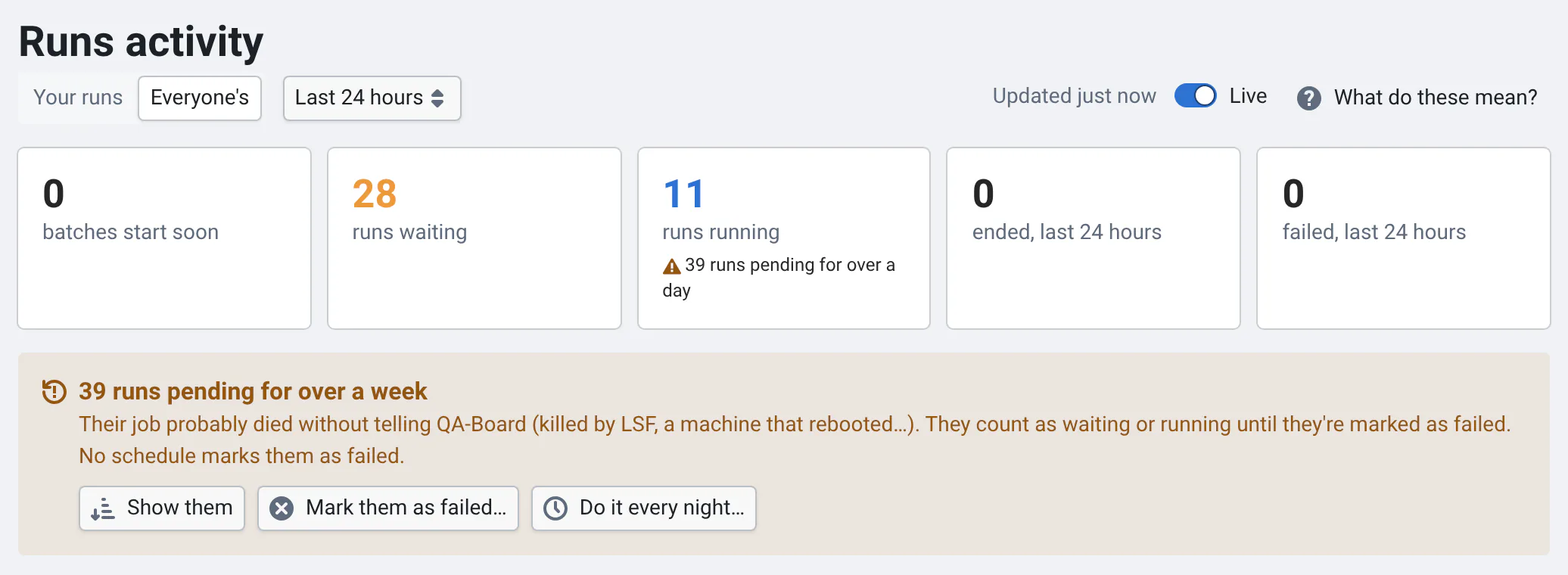
When LSF kills a job, or its machine reboots, its run can't tell QA-Board it ended: it shows as running forever, in Runs activity and on its commit. Fail stuck runs marks as failed the runs pending (waiting or running) for over a week, or what you choose. Nothing is deleted and their jobs aren't stopped: a run that still runs saves its results when it ends. Users can redo the others.
Start with a dry run, then schedule it, e.g. Stuck runs: Fail stuck runs of *, pending for over 1week, every
night. Runs activity tells admins how many runs are pending for over a week, offers to start the job or schedule it,
and says which schedule does it. Each run says why it failed (data.failed_reason).
Runs from before QA-Board recorded when runs start count from when they were created: a run redone just before the upgrade may look old. The dry run lists how many runs it would change, per project.
Schedule jobs
Click New schedule, choose the job and its settings, and when it runs with a cron expression
(minute hour day-of-month month day-of-week, e.g. 0 2 * * * every night at 2:00) in a time zone. The form shows the
next runs. A schedule's run is skipped, with a message, while a job of the same kind is still running.
When a scheduled job fails, ends with errors, or is given up because its workers kept dying, QA-Board emails the admins
what went wrong, its first errors and a link to the job (it needs emails). Send them to others with
the setting jobs.failure_email_to (user names or emails, QABOARD_JOBS_FAILURE_EMAIL_TO), or turn them off with
jobs.failure_emails (QABOARD_JOBS_FAILURE_EMAILS=false). A schedule that keeps failing sends at most one email
every 6 hours, and the jobs you start yourself, even with Run now, aren't emailed. With
Sentry, every job that goes wrong is reported there too.
For example, to replace the cron job of the server's setup:
- Old results: Delete old results of
*, by default older than1month, every Saturday at 1:59. - Nightly purge: Hard-delete runs of
*, Both, created before1month, every night. - Artifacts: Delete artifacts of
*, commits without runs for2months, every Sunday. - Stuck runs: Fail stuck runs of
*, pending for over1week, every night.
Where jobs run
The backend's container starts a worker next to the web server (qaboard-admin jobs worker): every replica runs one,
and the database decides which runs a job. The workers' list is in Admin → Storage, and their logs are the
backend's. Set QABOARD_JOBS_WORKER=0 to run the worker elsewhere, with the same storage mounts.
When the backend restarts (e.g. a deploy), the running job stops at its next check and is queued again: another worker resumes it where it was. If a worker is killed, its job is queued again after 10 minutes.
From the backend's container:
qaboard-admin jobs list
qaboard-admin jobs start hard_delete --param created_before=3months --param 'projects=["group/*"]' --param dry_run=true
qaboard-admin jobs worker --once   # runs what's queued and due, then exits
Errors are kept 90 days after their job ends (at most 20,000 per job, more are only counted). Starting, cancelling and scheduling jobs is in the audit log.